A good car heads-up display keeps essential driving information in your line of sight, helping you check speed, navigation, and alerts without repeatedly looking down at the dashboard.
We selected 10 HUDs ranging from simple GPS speedometers to feature-rich OBD2 and CarPlay-compatible systems, with options for different vehicles, budgets, and driving needs.
Best 10 Car Heads Up Display Picks for 2026
Best Large-Screen Data Display

- Large 5.5-inch HD screen
- Displays speed and vehicle data
- Includes OBD2 diagnostics and alerts
Best For: Drivers wanting a large, information-rich OBD2 display
Best Connected Dashboard Unit
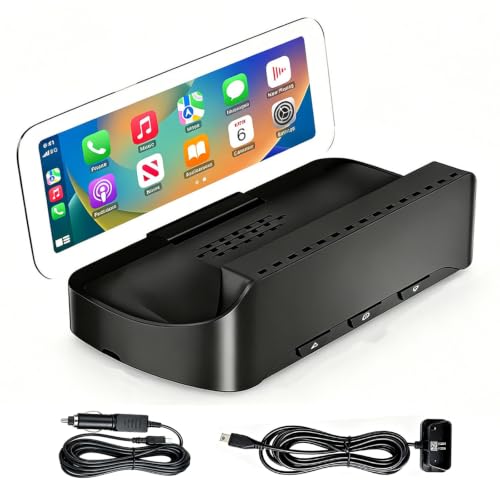
- Wireless Apple CarPlay and Android Auto
- Anti-glare display with adjustable angle
- Includes dual power-cable options
Best For: Drivers prioritizing navigation and smartphone connectivity
Best Simple Dual-Mode Gauge

- Offers OBD and GPS modes
- Shows speed, voltage, and distance
- Adds adjustable alerts and brightness
Best For: Buyers wanting a basic HUD with a GPS compatibility fallback
Best Broad-Compatibility Option

- Uses GPS for broad vehicle compatibility
- Supports CarPlay and Android Auto
- Includes dual power options and heat protection
Best For: Drivers with older, modified, or non-OBD-compatible vehicles
Best OBD2/GPS Combo
wiiyii P6 Car Heads Up Display
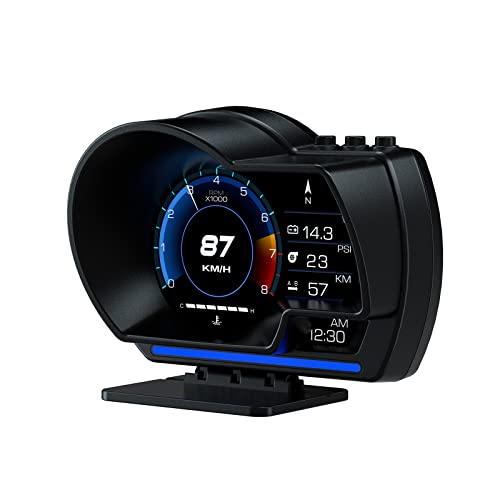
- OBD+GPS dual-mode operation
- Displays speed and vehicle data
- Adjustable brightness and overspeed alert
Best For: Drivers wanting a feature-rich HUD with diagnostic data
Best Plug-and-Play OBD2 Option
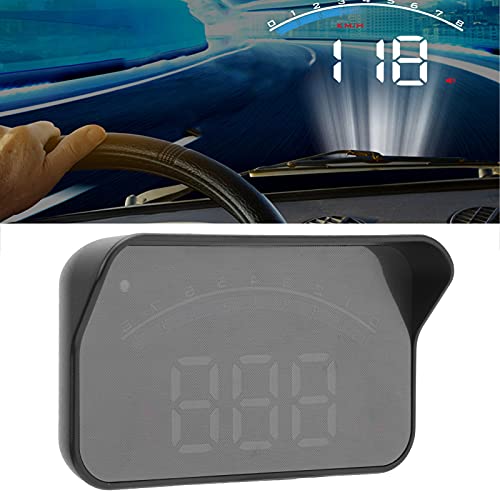
- Connects through the OBD interface
- Displays speed and engine information
- Includes multiple driving alerts
Best For: Drivers with compatible OBDII vehicles
Best USB GPS Display

- USB-powered with no OBD port needed
- Large speed display with auto brightness
- GPS+BDS positioning with 10Hz refresh
Best For: Drivers wanting a simple speed-only HUD with broad compatibility
Best OBD2 Option
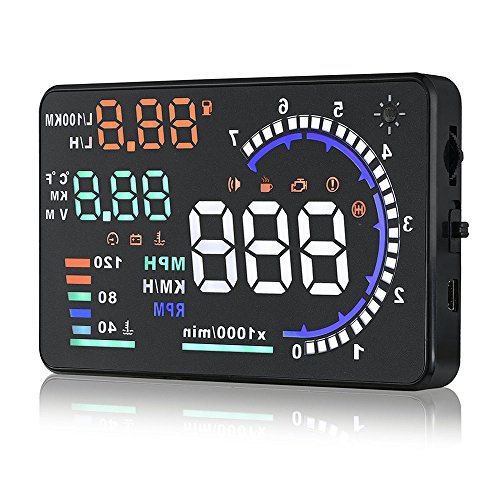
- 5.5-inch projection with multiple vehicle metrics
- Automatic or manual brightness control
- Overspeed alert and ignition-linked power
Best For: Compatible gasoline vehicles needing detailed OBD2 data
Best Universal Setup

- USB-powered with no OBD connection
- Large MPH display up to 115 MPH
- Automatic brightness and GPS/BDS positioning
Best For: Drivers wanting a simple speed display across many vehicle types
Best Alarm Features

- Shows speed plus engine and trip data
- Four configurable driving and engine alarms
- Automatic and manual brightness control
Best For: Compatible gasoline-car owners wanting alerts and detailed OBD2 monitoring
Best Large-Screen Data Display – 5.5-Inch OBD2 Car HUD
This car heads up display is built for drivers who want a large, information-rich view of speed and vehicle data. Its 5.5-inch HD screen shows MPH or KMH, while automatic brightness adjustment helps maintain visibility in daytime and nighttime driving.
Best For: Drivers seeking a large OBD2 display with vehicle monitoring and diagnostic features.
Pros:
- Large 5.5-inch HD display with automatic brightness adjustment
- Shows speed, RPM, water temperature, voltage, and fuel consumption
- Offers overspeed and voltage alerts plus failure detection and code clearing
- Plug-and-play setup through an OBD2 port on compatible vehicles
Cons:
- OBD2/EOBD compatibility is required
- The broad feature set may be more than drivers who only want speed
With its unusually large screen and built-in OBD2 functions, this model is a strong choice for buyers who want both a car heads up display and a basic vehicle-monitoring tool in one unit.
Best Connected Dashboard Unit – Wireless CarPlay HUD-V3
This car heads up display combines navigation and smartphone connectivity in a dashboard-mounted unit. Wireless Apple CarPlay and Android Auto support maps, calls, messages, music, Siri, and Google Assistant, while the anti-glare lens is designed for clear viewing in varied lighting.
Best For: Drivers who want wireless smartphone features and navigation without replacing the factory radio.
Pros:
- Supports wireless Apple CarPlay and Android Auto
- Anti-glare, high-brightness display with adjustable viewing angle
- Secure silicone base helps limit movement during braking, turns, and rough roads
- Includes OBD and cigarette-lighter power cables for flexible setup
Cons:
- The image appears on the unit’s anti-glare lens, not the windshield
- Projected content may be invisible while wearing sunglasses
- The OBD cable supplies power only and does not read raw vehicle data
This is better viewed as a connected dashboard display than a traditional windshield projector. Its main strengths are wireless phone integration, flexible placement, and straightforward installation.
Best Simple Dual-Mode Gauge – OBD/GPS Speedometer HUD
This car heads up display offers OBD and GPS modes so drivers can choose between vehicle data and broader vehicle compatibility. It can show speed, voltage, driving distance, and, in OBD mode, water temperature, with adjustable units and automatic brightness.
Best For: Drivers who want a basic speed and vehicle-data display with a GPS fallback.
Pros:
- Provides both OBD and GPS operating modes
- Displays speed, voltage, distance, and selected engine data
- Includes speed, water-temperature, and voltage alerts depending on mode
- Plug-and-play installation with automatic brightness adjustment
Cons:
- OBD II compatibility is limited according to the supplied notes
- OBD mode is not compatible with electric vehicles, diesel vehicles, pickups, RVs, or modified computers
- The product notes recommend GPS mode for incompatible vehicles
This model makes sense for buyers who want a straightforward gauge and the flexibility of GPS operation. Check your vehicle type carefully before relying on its OBD functions.
Best Broad-Compatibility Option – GPS CarPlay HUD-V3
This car heads up display uses GPS for broad vehicle compatibility and adds CarPlay and Android Auto functionality. It is designed for older, modified, and new-energy vehicles that may not support OBD connectivity, with dual power options and a compact dashboard installation.
Best For: Drivers needing GPS-based operation across varied vehicle types, including vehicles without usable OBD support.
Pros:
- GPS operation avoids model-specific OBD restrictions
- Designed for sedans, trucks, SUVs, RVs, pickups, older vehicles, and modified vehicles
- Supports CarPlay and Android Auto with phone pairing
- Includes OBD and cigarette-lighter power options plus overheat protection
Cons:
- Phone setup requires Bluetooth and Wi-Fi to be enabled
- Audio through the factory sound system requires a separate car-Bluetooth connection
- The unit’s cooling protection may cut power above 75°C
Its GPS-based design is the main reason to choose this model. It offers a practical route to speed display and smartphone integration when OBD compatibility is uncertain or unavailable.
Best OBD2/GPS Combo – wiiyii P6 Car Heads Up Display
The wiiyii P6 is a versatile car heads up display for drivers who want speed and vehicle information in their line of sight. Its OBD+GPS setup can show speed, voltage, fuel consumption, RPM, water temperature, and other data, while the adjustable brightness and overspeed color warning add practical driving feedback.
Best For: Drivers who want a feature-rich display with both OBD2 data and GPS backup.
Pros:
- Combines OBD and GPS modes for broader vehicle compatibility and more data.
- Displays speed, voltage, fuel consumption, RPM, water temperature, and fault codes.
- Offers 10 interfaces, adjustable brightness, and blue-to-red overspeed warning lighting.
- Includes dashboard and windshield mounting options with non-destructive installation.
Cons:
- Vehicles without a compatible OBD2 protocol are limited to GPS functionality.
- The display has more features to configure than a basic speed-only HUD.
Choose the P6 if you want more than projected speed. Its dual-mode design and diagnostic data make it a strong option for drivers who value information and flexibility, provided their vehicle supports the relevant OBD2 functions.
Best Plug-and-Play OBD2 Option – M6S Universal Car HUD
The M6S is a compact car heads up display designed to connect directly to a compatible vehicle’s OBD interface. It projects speed and other driving information onto the windshield, with selectable display modes, brightness adjustment, and alerts for speed, voltage, water temperature, fatigue, and faults.
Best For: Drivers with an OBDII-compatible vehicle who want straightforward installation and several safety alerts.
Pros:
- Plug-and-play connection through the included OBD cable.
- Can display speed, water temperature, voltage, and fault information.
- Includes speed, voltage, temperature, fatigue-driving, and fault alarms.
- Supports automatic or manual brightness adjustment to reduce glare.
Cons:
- Compatibility is limited to applicable OBDII vehicles.
- The notes indicate incompatibility with hybrid electric, diesel, pickup, sedan, and computer-modified vehicles.
The M6S makes sense when your vehicle meets its OBDII requirements and you prefer a connected display with multiple alerts. Confirm compatibility before buying, especially if your vehicle falls into one of the listed excluded categories.
Best USB GPS Display – K1 GPS Car Heads Up Display
The K1 is a GPS-based car heads up display that avoids the need for an OBD port. Powered through a 5V USB connection, it uses GPS and BDS positioning with a 10Hz refresh rate to project a large, easy-to-read speed display for cars, trucks, and motorcycles with a USB port.
Best For: Drivers seeking a simple, broadly compatible speed HUD without an OBD connection.
Pros:
- USB-powered design does not require an OBD port.
- GPS+BDS positioning, 10Hz refresh, and connection to up to 32 satellites support responsive speed tracking.
- Large font, anti-reflective shading, and automatic brightness adjustment aid readability.
- Compatible with most vehicles equipped with a USB port, including trucks and motorcycles.
Cons:
- GPS speed can deviate by about 0.6–1.8 MPH.
- Performance may be affected in tunnels, underground garages, heavy rain or fog, and behind metallic windshield film.
- It provides GPS-based speed rather than the broader OBD vehicle data offered by some HUDs.
The K1 is a practical choice if installation simplicity and vehicle flexibility matter most. Its limitations are typical of GPS displays, so it is best suited to drivers who mainly want a clear speed readout and regularly drive where satellite reception is reliable.
Best OBD2 Option – A8 5.5-Inch Multifunction HUD
This A8 is a practical car heads up display for drivers who want more than speed on the windshield. Its 5.5-inch projection shows speed, RPM, water temperature, voltage, and mileage, while plug-and-play OBD2 connectivity keeps installation straightforward on compatible gasoline vehicles.
Best For: Drivers with a compatible OBD II or EUOBD gasoline vehicle who want broad engine and trip information in one display.
Pros:
- Displays speed, RPM, water temperature, voltage, and mileage.
- Large 5.5-inch display uses nano-technology and an anti-ghosting reflective film.
- Offers automatic or manual brightness adjustment for day and night driving.
- Includes overspeed alerts and automatic ignition-linked power control.
Cons:
- Compatibility is limited to supported gasoline vehicles; several brands and model groups are excluded.
- Not suitable for diesel, hybrid, or other vehicles without compatible OBD2/EUOBD support.
Choose this model if vehicle compatibility checks out and you want a feature-rich OBD-based car heads up display. Buyers should verify their exact make and model before ordering, especially if they drive a Dodge, Jeep, Mazda, Suzuki, French, Italian, or select Hyundai/Kia vehicle.
Best Universal Setup – H1 GPS Speedometer HUD
The H1 is a simple car heads up display focused on readable GPS speed. It connects through a standard 5V USB source rather than the vehicle’s OBD port, making it a flexible choice for cars and many other USB-equipped vehicles.
Best For: Drivers who want a large MPH readout without OBD wiring or vehicle data compatibility concerns.
Pros:
- Uses GPS and BDS positioning, a 10Hz refresh rate, and support for up to 32 satellites.
- USB plug-and-play setup requires no OBD connection or wiring modification.
- Automatic brightness adjusts the display for changing light conditions.
- Works with vehicles including trucks, SUVs, motorcycles, ATVs, scooters, golf carts, boats, and buses when USB power and open-area reception are available.
Cons:
- GPS speed can vary by approximately 0.6–1.8 MPH from the vehicle’s speedometer.
- Reception may be limited indoors, in tunnels, underground garages, severe weather, or behind metallic windshield film.
- Primarily provides speed rather than the broader engine data available from OBD-based models.
For a straightforward speed reference, the H1 avoids the compatibility limitations of OBD devices. Its GPS-based operation is especially useful across different vehicle types, but users should allow roughly 10–30 seconds for the first satellite lock in an open area.
Best Alarm Features – MAIMEIMI OBD2 Data HUD
The MAIMEIMI is a car heads up display for compatible gasoline cars that combines windshield-projected speed with live vehicle data. Its OBD2/EOBD connection can show RPM, trip information, water temperature, voltage, and fuel-consumption modes, while multiple alarms add extra monitoring.
Best For: OBD2/EOBD gasoline-car owners who want configurable alerts and more detailed engine information than a basic GPS speed display provides.
Pros:
- Projects speed and supports RPM, trip, water temperature, voltage, and fuel-consumption displays.
- Provides overspeed, fatigue-driving, speed, and engine-failure alarms.
- Automatic brightness adjusts for daytime and nighttime viewing, with manual adjustment also available.
- Plug-and-play OBD installation with the option to fine-tune speed readings.
Cons:
- Limited to compatible OBDII/EOBD gasoline cars, generally from 2008 onward.
- Not compatible with listed Dodge, Jeep, Chrysler, French, Italian, Suzuki, Mazda, select Infiniti, Toyota, Lexus, Honda, and Kia models.
- Excludes hybrid, diesel, pickup, RV, and vehicles with modified ECUs according to the supplied compatibility notes.
This model is a strong fit when alerts and vehicle data matter as much as the speed projection. Confirm the exact vehicle compatibility before buying, since the extensive exclusion list is the main consideration.
How We Picked the Best Car Heads Up Display
We compared these car heads-up display models by looking at the information they show, installation method, power options, screen readability, vehicle compatibility, and ease of use. We also considered whether each unit relies on GPS, an OBD2 connection, or both. GPS models are generally easier to install and work across more vehicles, while OBD2 units can provide additional data such as engine RPM, coolant temperature, fuel consumption, and diagnostic warnings.
Because a HUD is intended to reduce distraction, we favored practical layouts, clear speed readings, adjustable brightness, and useful overspeed alerts. Features such as CarPlay, Android Auto, navigation support, and dual power cables were also considered where relevant.
Quick Comparison
| HUD type | Best for | Typical information | Installation |
|---|---|---|---|
| GPS speedometer | Universal compatibility | Speed, direction, overspeed alerts | USB or 12V power |
| OBD2 display | Vehicle data monitoring | Speed, RPM, temperature, fuel data | OBD2 port |
| CarPlay or Android Auto HUD | Connected navigation | Maps, calls, media, speed | Dashboard mount and phone pairing |
| Windshield projector | Large, easy-to-see readings | Speed and driving alerts | Reflective film or direct projection |
Key Buying Factors for a Car Heads Up Display
GPS Versus OBD2
Choose GPS if you want simple installation or drive multiple vehicles. GPS speed can take a moment to lock on and may be less responsive in tunnels. OBD2 models usually start quickly and can access more vehicle information, but they require a compatible diagnostic port and may not support every feature on every car.
Display Size and Visibility
A larger screen is easier to read, but it can occupy more windshield or dashboard space. Look for adjustable brightness, especially if you drive at night. Some projectors require reflective film to keep text crisp and prevent doubled images on certain windshields.
Power and Installation
Most units use USB, a cigarette-lighter adapter, or the vehicle’s OBD2 port. Check cable length and port location before buying. Plug-and-play installation is convenient, while hidden wiring may provide a cleaner finish but takes more effort.
Features You Will Actually Use
Prioritize accurate speed, clear alerts, and dependable visibility before adding extras. RPM, coolant temperature, fuel economy, navigation, and smartphone integration can be valuable, but only if your vehicle and driving habits support them.
Who Should Buy Which Car Heads Up Display?
- Choose a GPS model if you want the easiest universal setup and mainly need a prominent speed readout.
- Choose an OBD2 model if you want engine data, diagnostic information, or a faster vehicle-linked display.
- Choose a CarPlay or Android Auto model if navigation, music, calls, and smartphone connectivity matter as much as speed.
- Choose a larger windshield projector if visibility is your top priority, particularly for daytime driving or older vehicles with small dashboard displays.
Before ordering, confirm your vehicle’s OBD2 compatibility, available power connection, windshield layout, and local rules regarding windshield-mounted devices. A well-matched Car Heads Up Display should make important information easier to see without becoming another source of distraction.