A dependable laptop mount can turn a truck’s cab into a more usable mobile workstation without permanent drilling or a bulky desk setup. The right design keeps your computer supported while making better use of limited space.
We selected these 10 car laptop mounts for trucks based on installation style, adjustability, laptop compatibility, stability, and practical fit for field work, service calls, and long days on the road.
Best 10 Car Laptop Mounts for Trucks Picks for 2026
Best Overall Versatility

- Supports laptops from 6 to 17 inches and larger tablets
- No-drill seat-rail installation
- Includes brace, screen stabilizers, and USB cooling fan
Best For: Users wanting broad device compatibility and a bundled accessory package
Best Premium Build
RAM MOUNTS No-Drill Laptop Mount

- Uses existing seat bolts with no drilling
- Shock- and vibration-damping ball-and-socket system
- Lifetime warranty and dual articulating arm
Best For: Fleet and professional users prioritizing durable construction
Best Simple Adjustability
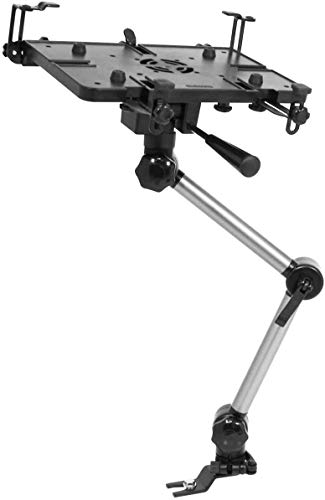
- Adjusts 180° vertically and 360° horizontally
- Rated for 17 pounds parked and 11 pounds moving
- Quick-release lever and knob-screw controls
Best For: Buyers seeking straightforward positioning and a defined load rating
Best Cooling and Quick Removal

- Dual USB fans help manage laptop heat
- 360° swivel with adjustable height and tilt
- Quick-release pole helps clear passenger space
Best For: Mobile workers using shared vehicles or working long hours on the road
Best Overall
VIVO Adjustable Car Laptop Mount
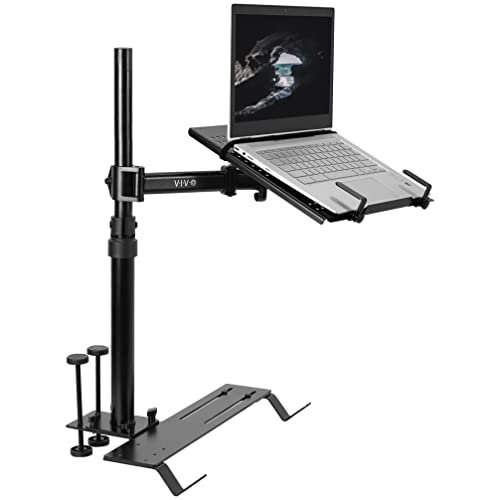
- Supports laptops up to 17 inches and 11 pounds
- Three mounting feet fit various seat-bolt angles
- Articulated arm with quick disconnect
Best For: Mobile workers needing broad vehicle compatibility and adjustability
Best for Ford Trucks
SPIRRELAB No-Drill Laptop Mount

- Designed for listed Ford F-150 and Super Duty models
- No-drill base with quick-release pole
- Five clamps, strap, and built-in cooling fans
Best For: Ford truck owners and field-service teams
Best for Everyday Laptops
Mount-It! Passenger Seat Laptop Stand
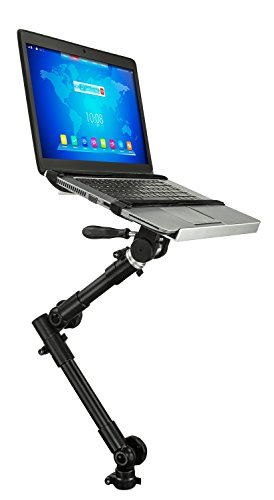
- Supports 12- to 15.4-inch laptops up to 9 pounds
- Height adjusts from 23 to 35 inches
- Vented tray with straps and quick release
Best For: Parked work sessions with standard-size laptops
Best Vehicle-Specific Pick
Silverado & Sierra No-Drill Laptop Mount

- Fits many listed Chevrolet and GMC trucks and SUVs
- Installs without drilling using seat bolts
- Cooling fans and adjustable positioning included
Best For: GM truck and SUV owners needing a stable daily workstation
Best Portable Option
Foldable Steering-Wheel Laptop Tray

- Lightweight, foldable aluminum construction
- Five height positions for adjustable use
- Works as a steering-wheel or desktop stand
Best For: Occasional parked work and highly portable vehicle use
Best Full-Motion Design
Mount-It! No-Drill Truck Laptop Mount

- 360-degree swivel with broad tilt adjustment
- Folds away when the passenger seat is needed
- Lifetime warranty and USB cooling fan
Best For: Mobile professionals needing flexible daily laptop positioning
Best Overall Versatility – Heavy-Duty Laptop Mount
For shoppers comparing car laptop mounts for trucks, the Mobotron MS-526B stands out for its broad device compatibility and included accessories. Its no-drill base attaches through an accessible passenger-seat rail bolt, while the adjustable deck supports laptops from 6 to 17 inches and tablets 6 inches and up.
Best For: Drivers and passengers who want a highly adjustable mount with cooling and screen-stabilizing accessories.
Pros:
- Fits most laptops from 6 to 17 inches and tablets 6 inches and up.
- No-drill installation can be completed quickly when the seat rail is suitable.
- Includes a support brace, screen stabilizers, and a preinstalled USB cooling fan.
- Adjustable positioning helps create a more ergonomic viewing angle.
Cons:
- Fit depends on a flat passenger seat rail with an accessible, visible bolt.
- At 8.6 pounds, it is relatively substantial to move between vehicles.
The MS-526B is a strong all-around choice when device range and included hardware matter. Confirm the seat-rail fit and USB power availability before ordering.
Best Premium Build – RAM MOUNTS No-Drill Laptop Mount
The RAM MOUNTS Universal No-Drill Laptop Mount is a durable option among car laptop mounts for trucks, cars, and fleet vehicles. It uses existing passenger-seat bolts, combines a Tough-Tray with a dual articulating arm, and adds ball-and-socket shock and vibration damping.
Best For: Fleet operators and mobile professionals seeking a robust, adjustable workstation backed by a lifetime warranty.
Pros:
- Installs without drilling or permanent vehicle modifications.
- Universal adjustable base is designed for a wide range of vehicles.
- Ball-and-socket system provides shock and vibration damping.
- Dual articulating arm offers flexible positioning, with swivel adjustment.
Cons:
- Compatible laptop size is listed as 10 to 16 inches, narrower than some alternatives.
- Fit still depends on compatible existing passenger-seat bolts.
With a marine-grade aluminum, high-strength composite, and powder-coated steel construction, this mount emphasizes durability and long-term support. Its lifetime warranty adds reassurance for frequent vehicle use.
Best Simple Adjustability – Mobotron MS-426 Laptop Mount
The Mobotron MS-426 is a straightforward pick for car laptop mounts for trucks and other vehicles when basic positioning control is the priority. It installs without drilling when the passenger seat rail and bolt meet the fit requirements, and its tray adjusts vertically and horizontally.
Best For: Users who want a compact, adjustable vehicle workstation with a clearly stated load capacity.
Pros:
- Supports up to 17 pounds when parked and 11 pounds while moving.
- Tray adjusts 180 degrees vertically and 360 degrees horizontally.
- Quick-release lever and knob-screw simplify position changes.
- Includes laptop-mount components and additional mounting accessories.
Cons:
- Installation requires a flat passenger seat rail and an accessible, visible bolt.
- The supplied notes list compatibility with cars rather than specifically confirming every truck configuration.
- No cooling fan or screen stabilizers are listed.
The MS-426 makes sense for buyers who value practical adjustment and a defined weight rating over extra accessories. Observe the moving-use capacity when the vehicle is in motion.
Best Cooling and Quick Removal – MELIPRON Truck Laptop Mount
The MELIPRON Universal Laptop Mount combines a no-drill seat-rail installation with dual USB cooling fans and full-motion adjustment. For shoppers seeking car laptop mounts for trucks, its quick-release telescopic pole is especially useful when the passenger area needs to be cleared between work sessions.
Best For: Technicians, contractors, and shared-vehicle users who need cooling, swivel adjustment, and easy removal.
Pros:
- Dual USB cooling fans help prevent laptop overheating.
- Provides adjustable height, tilt, and 360-degree rotation.
- No-drill mounting attaches directly to passenger seat-rail bolts.
- Quick-release design is intended to preserve passenger space when removed.
Cons:
- At 12 pounds, it is the heaviest mount in this comparison.
- Fit depends on compatible passenger seat-rail bolts.
- Cooling fans require USB power.
This is a feature-rich choice for mobile work, particularly when temperature management and occasional removal matter. The included two-year warranty and free replacement parts provide additional ownership support.
Best Overall – VIVO Adjustable Car Laptop Mount
For shoppers comparing car laptop mounts for trucks, the VIVO MOUNT-CAR01 is a versatile choice for vehicles with exposed floor seat bolts. Its ventilated tray supports laptops up to 17 inches and 11 pounds, while the articulated arm provides broad positioning flexibility.
Best For: Drivers and mobile workers who want a highly adjustable laptop workstation that can move between cars, trucks, SUVs, and vans.
Pros:
- Includes three mounting feet for compatibility with different seat-bolt angles.
- Supports laptops and tablets up to 17 inches and 11 pounds.
- Offers tilt, swivel, rotation, and height adjustment.
- Quick-disconnect design frees the passenger seat when needed.
Cons:
- Requires exposed, compatible floor seat bolts.
- The 11-pound stand may be more equipment than occasional users need.
With its wide device capacity and extensive articulation, this VIVO mount is a strong all-around option for turning the passenger side of a compatible truck into a temporary workstation.
Best for Ford Trucks – SPIRRELAB No-Drill Laptop Mount
Among car laptop mounts for trucks, this SPIRRELAB model is tailored to several Ford pickup lines and installs without drilling. Its three-point base, five adjustable clamps, securing strap, and built-in fans are designed to provide stability and airflow during mobile work.
Best For: Ford F-150 and Super Duty owners, including fleet and field-service users who need a secured, adjustable computer mount.
Pros:
- Fits listed 2015–2026 F-150 and 2017–2026 F-250 through F-550 models.
- Uses a no-drill installation with a quick-release telescopic pole.
- Five clamps and a securing strap help reduce sliding and wobble.
- Built-in fans help manage laptop heat.
Cons:
- Its stated compatibility is focused on Ford models and should be verified before purchase.
- The model’s specialized fit may be less suitable for users who switch among different vehicle makes.
For the specified Ford trucks, the reinforced mounting system and dual-articulating arm make this a practical choice when stability, cooling, and no-drill setup matter.
Best for Everyday Laptops – Mount-It! Passenger Seat Laptop Stand
This Mount-It! stand is a straightforward option for shoppers seeking car laptop mounts for trucks or other vehicles. It attaches at the front passenger seat bolt and supports common 12- to 15.4-inch laptops up to 9 pounds, with a vented tray and quick-release lever for parked work sessions.
Best For: Users with standard-size work laptops who need a removable passenger-seat workstation between stops.
Pros:
- Fits 12- to 15.4-inch laptops weighing up to 9 pounds.
- Telescoping tubes provide 23- to 35-inch height adjustment.
- Full swivel and tilt help position the screen comfortably.
- Vented tray, Velcro straps, and quick release support practical parked use.
Cons:
- It is limited to smaller and lighter laptops than the VIVO model.
- Seat-bolt compatibility and airbag clearance should be checked before installation.
- It is intended for use while parked, not while driving.
With a focused size range, simple seat-bolt mounting, and lifetime manufacturer warranty, this stand suits routine administrative work without the capacity of a larger heavy-duty platform.
Best Vehicle-Specific Pick – Silverado & Sierra No-Drill Laptop Mount
For drivers searching for car laptop mounts for trucks, this MELIPRON model stands out when you own a compatible Chevrolet or GMC vehicle. It bolts to existing passenger-seat hardware without drilling and uses a three-point steel support base for added stability.
Best For: Silverado, Sierra, Tahoe, Suburban, Yukon, and Yukon XL owners who need a dedicated workstation for dispatching, diagnostics, or extended work shifts.
Pros:
- Vehicle-specific fit for many 2019–2026 Chevrolet and GMC trucks and SUVs.
- No-drill installation using existing passenger-seat bolts.
- Height, tilt, and 360-degree rotation adjustments support different seating positions.
- Includes two USB-powered cooling fans and five vinyl-coated tray clamps.
Cons:
- Compatibility is limited to the listed Chevrolet and GMC vehicles.
- At 10 pounds, it is heavier than portable tray-style options.
- The tray supports laptops up to 17 inches and a maximum load of 5 kg.
This is a strong choice if you want a permanently ready, heavy-duty truck workstation and drive one of the specified GM vehicles. Its steel-and-aluminum construction favors stability and daily use over portability.
Best Portable Option – Foldable Steering-Wheel Laptop Tray
Among car laptop mounts for trucks, this foldable tray is the simplest option for temporary work. It attaches to compatible round steering wheels, adjusts to five height positions, and folds for storage in a seat seam, briefcase, or included storage bag.
Best For: Travelers, drivers, and truck or SUV owners who want a lightweight laptop surface for short parked work sessions and easy transport.
Pros:
- Lightweight aluminum design weighs 13.44 ounces.
- Five-position height adjustment helps tailor the working height.
- Flips between steering-wheel use and desktop-stand mode.
- Compact, foldable design is easy to store and carry.
Cons:
- Designed for round steering wheels, so fit may vary by vehicle.
- It is a temporary tray rather than a bolted-in, heavy-duty mount.
- The 10.8-by-13-inch surface may be limiting for larger laptops or accessories.
This portable stand makes sense when convenience and storage matter more than maximum stability. It is particularly useful for occasional parked work, but buyers wanting a dedicated workstation should consider a seat-bolt mount instead.
Best Full-Motion Design – Mount-It! No-Drill Truck Laptop Mount
For buyers comparing car laptop mounts for trucks, the Mount-It! MI-527 combines a no-drill seat-bolt installation with broad positioning control. Its arm swivels 360 degrees, offers multiple tilt ranges, and folds toward the seat when the passenger area is needed again.
Best For: Field technicians, contractors, inspectors, and delivery drivers who need a repositionable laptop or tablet workstation during daily stops.
Pros:
- Full-motion arm provides 360-degree swivel and two-axis tilt adjustment.
- Height-adjustable pole extends from 14 to 22.25 inches.
- Supports laptops and tablets up to 17 inches with a 6.6-pound capacity.
- Ventilated tray, USB-powered fan, safety clips, and a lifetime warranty add practical value.
Cons:
- Seat-bolt fit should be checked before ordering.
- It weighs 7.1 pounds and is not water resistant.
- Devices near the 6.6-pound limit require careful weight checking.
The MI-527 is a versatile middle ground between a fixed workstation and a portable tray. Its folding arm and extensive adjustment range suit mobile professionals, while the seat-bolt design avoids permanent vehicle modification.
How We Picked These Car Laptop Mounts for Trucks
We focused on the features that matter most in a working vehicle: secure support, useful adjustment, practical installation, and compatibility with common laptops and truck interiors. The lineup includes universal no-drill mounts, seat-mounted stands, steering-wheel trays, heavy-duty designs, and vehicle-specific models for select Ford and GM trucks.
We also considered whether each mount can be adjusted for viewing angle, height, and reach; whether it includes stabilizing features; and how easily it can be removed or repositioned. Because truck cabins vary significantly, a mount that works well in one vehicle may not suit another, so fit and available mounting space remain essential checks.
Quick Comparison
| Mount type | Best for | Main advantage | Watch for |
|---|---|---|---|
| Universal no-drill | Frequent vehicle changes | Flexible installation | Cabin and seat clearance |
| Heavy-duty tray mount | Rugged field use | Greater support and stability | More weight and bulk |
| Vehicle-specific mount | Compatible Ford or GM trucks | More tailored fit | Limited vehicle compatibility |
| Steering-wheel tray | Short, parked tasks | Portable and compact | Not intended for driving use |
| Passenger-seat stand | Cabin workstation use | Convenient reach and positioning | May occupy passenger space |
Key Buying Factors for Car Laptop Mounts for Trucks
Installation and Truck Compatibility
Confirm how the mount attaches before buying. Seat-rail and passenger-seat models usually avoid drilling, while vehicle-specific products may depend on a particular cab, console, or seat configuration. Check your truck’s year, model, trim, and seat layout carefully.
Laptop Size, Weight, and Tray Design
Compare your laptop’s dimensions and weight with the mount’s stated capacity. A tray with adjustable edges or retaining lips can hold different notebooks more securely, while larger 17-inch computers may require a wider platform and stronger support.
Stability and Adjustment
Look for stabilizers, reinforced arms, locking joints, and a tray that resists twisting. Height, tilt, swivel, and reach adjustments help you create a usable position, but every added joint can introduce movement if it is not tightened properly.
Safety and Everyday Usability
Use laptop mounts only while parked unless the product and local regulations clearly permit otherwise. Keep airbags, controls, mirrors, pedals, and your line of sight unobstructed. Consider whether you need quick removal, access to charging ports, or room for a mouse and documents.
Who Should Buy Which Car Laptop Mounts for Trucks?
Choose a universal no-drill mount if you share vehicles, change trucks, or want the simplest installation. A heavy-duty model is better for technicians and field professionals who need a steadier platform for frequent use. Pick a vehicle-specific Ford or Chevrolet/GMC mount when you own a confirmed compatible truck and prefer a more tailored fit.
A passenger-seat mount suits users who want a dedicated in-cab workstation, while a steering-wheel tray is most useful for occasional parked tasks and easy storage. Before ordering, measure the laptop, inspect the available cabin space, and verify that the mounting method matches your truck.