Working from a vehicle is easier when your laptop has a stable platform instead of resting on your lap or the passenger seat. The best no-drill car laptop mounts provide a practical workstation without permanent modifications.
This roundup compares 10 options for cars, trucks, and vans, with attention to laptop size, vehicle fit, adjustability, support, and everyday stability. Use the guide below to narrow the choices before buying.
Best 10 No Drill Car Laptop Mounts Picks for 2026
Best Overall
Heavy-Duty Universal Laptop Mount

- No-drill seat-rail installation
- Dual cooling fans and rugged metal build
- 360-degree swivel with quick release
Best For: Frequent mobile work in cars, trucks, and fleet vehicles
Best Premium Pick

- Lifetime warranty
- Shock- and vibration-damping ball-and-socket system
- Fits 10- to 16-inch laptops
Best For: Professional and fleet users seeking long-term durability
Best for Everyday Laptops
Adjustable Passenger-Seat Stand
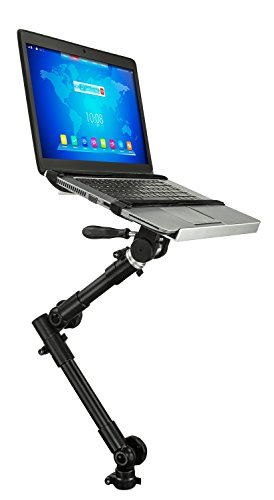
- Fits 12- to 15.4-inch laptops up to 9 pounds
- Quick-release vented tray
- Lifetime warranty and US-based support
Best For: Parked work sessions with standard laptops
Best for Ford Trucks

- Designed for listed Ford F-Series model years
- Five clamps plus a securing strap
- Dual fans and four-joint adjustment
Best For: Ford truck owners needing a secure mobile workstation
Best for Easy Setup
Mount-It! Braced No-Drill Laptop Mount

- Secondary brace provides added mounting support.
- Fits laptops and tablets up to 17 inches.
- USB-powered cooling fan and locking joints.
Best For: Drivers wanting a reinforced, broadly compatible mount
Best for GM Trucks
SPIRRELAB Seat-Bolt Laptop Mount

- Fits specified Chevy and GMC trucks and SUVs.
- Adjusts from 11.9 to 20 inches in height.
- Includes five clamps and two USB-powered fans.
Best For: Owners of compatible Chevrolet and GMC vehicles
Best for Ford Transit Vans
RAM MOUNTS No-Drill Laptop Mount

- Custom fit for 2014-2026 Ford Transit Cargo Vans.
- No-drill seat-rail installation.
- Dual swing arm and lifetime warranty.
Best For: Ford Transit Cargo Van operators needing a durable workstation
Best with Extra Features
Mount-It! MI-527 No-Drill Laptop Mount

- 360-degree swivel with two adjustable joints
- Ventilated tray and USB-powered cooling fan
- Lifetime warranty and fold-away design
Best For: Frequent mobile workers needing broad adjustment and easy storage
Best for Tacoma Owners

- Fits 2024–2026 Toyota Tacoma models
- Two USB-powered cooling fans
- Quick-disconnect rod and adjustable workstation
Best For: Toyota Tacoma owners seeking a vehicle-specific no-drill setup
Best for Fleet Work
SPIRRELAB Universal Car Laptop Mount

- Detachable upper workstation leaves the base installed
- Dual USB fans and adjustable articulating arms
- Fits compatible cars, trucks, vans, and SUVs
Best For: Field service and fleet users needing a removable workstation
Best Overall – Heavy-Duty Universal Laptop Mount
For shoppers comparing no drill car laptop mounts, the MELIPRON Universal Laptop Mount stands out with a sturdy aluminum-and-steel build, built-in cooling fans, and flexible positioning. It attaches to existing passenger seat rail bolts without drilling and includes a quick-release telescoping pole.
Best For: Technicians, contractors, fleet users, and drivers who want a durable, adjustable workstation that can be removed when the passenger seat is needed.
Pros:
- No-drill seat-rail installation helps preserve the vehicle structure.
- Dual cooling fans help manage laptop heat.
- Height, tilt, and 360-degree rotation provide flexible viewing.
- Quick-release design preserves passenger space when removed.
Cons:
- Its 12-pound weight is relatively substantial for a vehicle mount.
- Fitment depends on the vehicle’s passenger-seat rail bolts.
With its heavy-duty construction, full-motion adjustment, cooling fans, and two-year warranty, this is a well-rounded choice for frequent mobile work, provided the mounting hardware matches your vehicle.
Best Premium Pick – RAM Tough-Tray No-Drill Mount
The RAM MOUNTS Universal No-Drill Laptop Mount is a strong option among no drill car laptop mounts for users who prioritize a proven mounting system. It installs using existing passenger-seat bolts, supports 10- to 16-inch laptops, and uses a ball-and-socket system designed to damp shock and vibration.
Best For: Fleet operators and professionals who want a configurable laptop workstation backed by a lifetime warranty.
Pros:
- Installs without drilling or permanent vehicle modifications.
- Universal adjustable base fits a wide range of cars and trucks.
- Ball-and-socket design helps damp shock and vibration.
- Dual articulating swing arm offers multiple adjustment points.
Cons:
- The notes do not specify cooling fans or ventilation features.
- Vehicle fit still depends on compatibility with existing passenger-seat bolts.
RAM’s adjustable architecture and lifetime warranty make this a compelling long-term choice for professional use, especially when vibration control and mounting flexibility matter more than added accessories.
Best for Everyday Laptops – Adjustable Passenger-Seat Stand
The Mount-It! MI-7410 offers a practical approach to no drill car laptop mounts for common work laptops and Chromebooks. It supports devices from 12 to 15.4 inches and up to 9 pounds, with a telescoping arm, full swivel and tilt, quick-release tray, and vented surface.
Best For: Mobile professionals who work between stops and need a removable stand for a standard-size laptop.
Pros:
- Supports 12- to 15.4-inch laptops up to 9 pounds.
- Telescoping height adjustment ranges from 23 to 35 inches.
- Quick-release lever detaches the tray in seconds.
- Vented tray and integrated straps support practical everyday use.
Cons:
- It is intended for use while parked, not while driving.
- It requires basic hand tools and attention to seat and airbag clearance.
- The 9-pound capacity is lower than some heavy-duty alternatives.
This mount balances useful adjustment with easy removal and is a sensible fit for parked work sessions. Check seat-bolt compatibility and airbag clearance before installation.
Best for Ford Trucks – F-Series Laptop Mount
Ford truck owners looking for no drill car laptop mounts should consider this SPIRRELAB stand, which is designed for multiple F-Series models. It combines a three-point base, five adjustable tray clamps, a securing strap, dual cooling fans, and a four-joint articulating arm.
Best For: Ford F-150, F-250, F-350, F-450, and F-550 owners who need a stable mobile workstation for laptops, tablets, or computers.
Pros:
- Listed compatibility covers 2015-2026 F-150 and 2017-2026 F-250 through F-550 models.
- Three-point support, five clamps, and a strap help secure the device.
- Dual fans help reduce laptop heat buildup.
- Quick-release telescopic pole frees passenger space when needed.
Cons:
- Its stated vehicle compatibility is focused on Ford models.
- The one-year warranty is shorter than some competing options.
For the listed Ford trucks, this mount offers a particularly secure setup with active cooling and substantial adjustability. Confirm your exact model year and seat-bolt fit before ordering.
Best for Easy Setup – Mount-It! Braced No-Drill Laptop Mount
For shoppers comparing no drill car laptop mounts, the Mount-It! MI-427 stands out for its added support brace, broad device fit, and adjustable tray. It attaches through compatible seat-bolt or bracket configurations without permanent vehicle modification and supports laptops or tablets up to 17 inches.
Best For: Drivers who want a reinforced, adjustable mount with built-in cooling and broad laptop compatibility.
Pros:
- Secondary support brace adds another anchor point beyond the main arm.
- Adjustable tray and side grips fit laptops and tablets up to 17 inches.
- Toothed locking joints help hold tilt and swivel positions while driving.
- Built-in USB-powered fan promotes airflow beneath the laptop.
Cons:
- The listed tray capacity is 6.6 pounds, so heavier devices may be unsuitable.
- Installation depends on having a compatible seat-bolt or bracket configuration.
- The fan requires a USB connection to the laptop.
Its lifetime warranty, included setup resources, and reinforced design make this a well-rounded choice. Check your vehicle’s seat-bolt layout and device weight before ordering.
Best for GM Trucks – SPIRRELAB Seat-Bolt Laptop Mount
This SPIRRELAB mount is one of the more vehicle-specific no drill car laptop mounts, fitting select Chevy Silverado, GMC Sierra, Tahoe, Suburban, and Yukon models. It secures to the passenger seat bolt, offers adjustable reach and height, and includes a ventilated tray for 10- to 17-inch laptops.
Best For: Owners of compatible 2019-2025 Chevrolet or GMC trucks and SUVs who need a flexible passenger-seat laptop setup.
Pros:
- Designed for a broad range of specified Silverado, Sierra, Tahoe, Suburban, and Yukon models.
- Height adjusts from 11.9 to 20 inches, with up to 20 inches of reach.
- Three locking joints and 180-degree arm rotation support flexible positioning.
- Tray includes five adjustable clamps and two USB-powered fans.
Cons:
- Compatibility is limited to the listed Chevrolet and GMC vehicle applications.
- Its maximum supported load is 5 kg.
- The one-year warranty is shorter than some competing lifetime-backed options.
For the specified GM vehicles, the seat-bolt installation and extensive adjustment range are practical advantages. Verify your exact model year and trim before purchase.
Best for Ford Transit Vans – RAM MOUNTS No-Drill Laptop Mount
The RAM-VB-194-SW1 is a purpose-built option among no drill car laptop mounts, designed for 2014-2026 Ford Transit Cargo Vans. Its no-drill seat-rail mount, dual articulating swing arm, and universal tray are aimed at creating a durable mobile workstation without drilling into the van.
Best For: Ford Transit Cargo Van operators who prioritize vehicle-specific fit and durable construction.
Pros:
- Custom fit for 2014-2026 Ford Transit Cargo Vans.
- No-drill seat-rail mounting preserves the vehicle’s interior.
- Dual articulating swing arm allows flexible positioning.
- Powder-coated steel and marine-grade aluminum construction support repeated use.
Cons:
- It is not presented as a universal mount for other vehicle models.
- The supplied notes do not specify a laptop size range or weight capacity.
- Its vehicle-specific design may offer less flexibility outside Ford Transit Cargo Vans.
With a dedicated Transit fit and lifetime warranty, this is a strong choice for fleet or work-van use. Confirm that your vehicle is a Cargo Van from the covered model years before ordering.
Best with Extra Features – Mount-It! MI-527 No-Drill Laptop Mount
The Mount-It! MI-527 is a versatile choice among no drill car laptop mounts, with multiple installation configurations, broad positioning adjustments, and a fold-away tray. It supports laptops and tablets up to 17 inches, though the stated tray dimensions and weight limit should be checked against your device before ordering.
Best For: Field technicians, contractors, inspectors, and delivery drivers who need a foldable mobile workstation with extensive adjustment.
Pros:
- 360-degree swivel, two articulated joints, and a 14- to 22.25-inch height range provide flexible positioning.
- Ventilated tray plus a USB-powered fan helps move heat away during extended parked sessions.
- Lifetime manufacturer warranty, US-based support, and included setup resources add confidence.
- Folds toward the seat when you need the passenger area back.
Cons:
- The tray supports devices up to 15.5 inches wide, 11.5 inches deep, and 6.6 pounds, so larger or heavier equipment may not fit.
- Fit depends on having a compatible seat-bolt arrangement, which should be checked before purchase.
Its combination of full motion, cooling, warranty coverage, and fold-away storage makes the MI-527 a well-rounded option for regular mobile work. Verify both your device dimensions and seat-bolt configuration first.
Best for Tacoma Owners – Trumgeta Tacoma Laptop Mount
Designed specifically for 2024–2026 Toyota Tacoma models, this Trumgeta mount is a targeted option among no drill car laptop mounts. Its base attaches to the existing passenger-seat track, while three locking joints, a telescoping rod, and adjustable clamps help create a usable workstation without drilling.
Best For: 2024–2026 Toyota Tacoma owners who want a vehicle-specific laptop or tablet workstation.
Pros:
- Vehicle-specific fit is designed around the existing passenger-seat track for no-drill installation.
- Two USB-powered fans provide additional airflow during extended use.
- Three locking joints, a telescoping rod, and five adjustable tray clamps support flexible positioning.
- Quick-release telescoping rod helps clear the passenger space when needed.
Cons:
- Compatibility is limited to the listed 2024–2026 Toyota Tacoma application.
- The supplied details do not provide specific tray width or depth measurements, so confirm your device fit before ordering.
For the specified Tacoma model years, the vehicle-specific base and quick-disconnect design simplify installation and removal. It is less suitable if you drive another vehicle or need detailed laptop fit measurements before buying.
Best for Fleet Work – SPIRRELAB Universal Car Laptop Mount
The SPIRRELAB Universal car Laptop Mount combines a three-point seat-bolt base with a detachable upper workstation, making it a practical pick among no drill car laptop mounts for parked field work. It fits cars, trucks, vans, and SUVs when the required passenger-seat bolt pattern and clearance are available.
Best For: Fleet operations, mobile service, diagnostics, and field teams that need a removable upper workstation.
Pros:
- 11.9- to 20-inch height adjustment, 360-degree swivel, tilt, and articulating arms provide flexible positioning.
- Two built-in USB cooling fans help reduce heat buildup during extended parked use.
- Supports 9- to 17-inch laptops and tablets up to 11 pounds.
- Upper section detaches while the base remains installed, reducing passenger-side obstruction.
Cons:
- Fit must be verified using the vehicle’s bolt type, 6.6- to 17-inch mounting span, and available clearance.
- It is not intended for hook-style seat mounts.
- The stated 5 kg maximum in the specifications is lower than the 11-pound capacity described in the product bullets, so staying within the more conservative limit is prudent.
This mount stands out for its removable workstation and broad vehicle coverage, provided your seat-bolt layout passes the fit check. Buyers should also resolve the supplied weight-capacity discrepancy conservatively before using a heavier device.
How We Picked the Best No Drill Car Laptop Mounts
We selected mounts across the main use cases: universal passenger-seat installations, heavy-duty truck stands, van-specific systems, and vehicle-fit models. The comparison focuses on the details that most affect real-world use, including stated laptop capacity, mounting method, support braces or stabilizers, adjustment range, and compatibility claims.
Because fit can vary by seat design, center-console layout, and vehicle trim, treat manufacturer fit information as a starting point. Confirm the listed model year and installation requirements before ordering.
Quick Comparison
| Type | Best for | What to check |
|---|---|---|
| Universal no-drill mount | Multiple vehicles | Seat clearance, laptop size, and tray adjustment |
| Heavy-duty truck stand | Frequent mobile work | Base rigidity, stabilizer design, and weight capacity |
| Vehicle-specific mount | Exact truck or van models | Year range, cab configuration, and console compatibility |
| Large-laptop mount | 17-inch or larger laptops | Tray dimensions, support brace, and screen clearance |
Key Buying Factors for No-Drill Car Laptop Mounts
Vehicle and Seat Compatibility
A no-drill installation typically uses existing seat hardware or a seat-mounted base. Check whether the mount is designed for your vehicle, seat rail arrangement, cab style, and model year. A universal product may offer broader compatibility, but a vehicle-specific option can provide a more predictable fit.
Laptop Size and Tray Support
Measure your laptop, including any protective case, rather than relying only on screen size. Smaller trays may suit compact notebooks, while 17-inch systems need wider platforms and stronger edge support. Look for a raised lip or other retention feature if you work while parked on uneven ground.
Stability and Adjustment
Support braces, stabilizers, and rigid tray arms can reduce wobble. Adjustable height, tilt, and swivel help position the screen and keyboard, but more moving joints can also introduce play. Prioritize a secure base and lockable adjustments over maximum articulation.
Installation and Daily Use
Confirm whether installation requires removing seat bolts, using tools, or temporarily moving the seat. Consider how quickly the mount can be folded, removed, or repositioned when carrying passengers. Never operate a laptop while driving; these products are intended for use while parked.
Who Should Buy Which No Drill Car Laptop Mounts?
Choose a universal no-drill mount if you switch vehicles or want the simplest broadly compatible setup. A heavy-duty truck mount is better for frequent field work, larger laptops, or users who value extra rigidity. Pick a vehicle-specific Ford, Chevrolet, GMC, Toyota, or Ford Transit model when precise fit is more important than flexibility.
For 17-inch laptops, focus on the Mount-It! and other large-tray options with a support brace or stabilizer. For occasional email, dispatch, or document work, a lighter universal stand may be sufficient. Whichever model you choose, verify the fit, measure your laptop, and ensure the final position does not interfere with pedals, controls, airbags, or passenger movement.